Reporting for Home Education in Qld
Getting ready to report and want help with the process? This is for you.
What do I need to complete reporting for home education?
Proof of parental responsibility
Under Queensland law, a parent has the right to choose home education for their child by applying to Queensland Home Education (QHE).
Only one parent’s signature is required on the application form to legally register a child.
However, it is important to note:
Shared Responsibility: While only one signature is needed for the QHE process, the department assumes that parents are acting in accordance with any existing parenting arrangements.
Court Orders: If there are specific Family Court Orders in place stating that educational decisions must be made jointly, or if a court has granted one parent sole responsibility for educational matters, these orders must be respected and disclosed if requested.
The “Applicant” Role: The parent who signs the form becomes the primary point of contact for QHE, though a second parent can be listed to ensure they are kept informed of the registration status.
While we often use the term “parent,” the right to register a child for home education extends to anyone who holds legal parental responsibility.
Guardians & Carers: You do not necessarily need to be the biological parent of the child to submit an application to Queensland Home Education (QHE).
Legal Responsibility: If you are a legal guardian or hold a court order granting you parental responsibility for the child’s education, you are eligible to be the applicant.
Documentation: When applying in these circumstances, you simply need to provide the relevant legal documentation (such as a Guardianship Order or Parenting Order) where requested to verify your authority to make educational decisions on their behalf.
Supporting documents
Some additional supporting documents that:
- prove your child is eligible for home education by age (usually a birth certificate)
- prove you as the child’s parent or legal guardian (usually a birth certificate or other legal document like a Medicare card)
- summarise your child’s educational plans and goals for the year ahead
- confirm your child is not enrolled at a school (incl. distance education). (This can be as simple as proof of the date you contacted a school in writing to end an enrolment, such as from your email history)
- relate to parental responsibility for the child, such as any court orders.
- You will also need to sign a declaration stating that the information you’re providing is correct. This is available through the application process as well as HERE.
*Sometimes you will also need to provide additional information or documentation to meet the requirements—for example, if your name is different from the name on your child’s birth certificate. If you do not easily recognise what you may need, staff in QHE will make contact with you to discuss and request any additional documentation required.
Proof of age eligibility
Providing evidence of your child’s name and date of birth can be done with one or more of the following:
- their birth certificate or birth extract
- their passport
- citizenship documents
- Australian visa documents
Compulsory school age vs. Registration age - differences
Compulsory schooling age in Queensland is set out in the Education (General Provisions Act 2006 as 6.5 years to 16 years. During this period children are expected to be participating in a recognised form of education, of which home education is one option.
However, a child can be registered for home education from the year they are turning 5.5 years, where a child is at least 4 years + 6 months + 1 day on Jan 1 of that year, up until the end of the year the child turns 18 years. This extends beyond the compulsory schooling age at both the younger and older ages where a child can be registered by choice.
Regulatory authority
The Department of Education’s Queensland Home Education (QHE) unit (formerly HEU) is the regulatory authority in Queensland. They can be shortened to QHE or QHEU.
Application process
To apply online or by email/post, complete the application options in STEP 1 on the Queensland Home Education website HERE.
You can also follow our easy step by step guide in the next section below to assist you with the online application process.
~~~~~~~~~~
The applicant is the child’s parent or guardian, not the child. You can include the details of a second applicant parent on the application form. Queensland Home Education will discuss the application only with the parents who are named on the form.
You must have a Queensland home address and provide home education principally at the child’s usual place of residence.
Make sure the name on the document showing you have parental responsibility matches the name you write in your application. If you have changed your name, you will need to provide extra documentation like a marriage certificate or a change-of-name certificate to show the connection.
If your family has any court orders in place that relate to parental responsibility for the child, you must provide a copy of these with your application.
You must complete all sections of the form. You’ll need to fill out a separate application form for each child you are wishing to register for home education.
Annual reporting
Parents must submit annual reports to the QHE demonstrating their child’s educational progress. Reports are due in the 10th month of the child’s registration. This is expected to include some samples in English, Math, and one other area.
Completing the QHE reporting upload process
The following is a step by step of the reporting process to help you plan and complete the reporting form online that is emailed to you from QHE.
Opening the online QHE reporting link
To open the online reporting form, head to your email and click the link provided. This email will contain:
- child’s name
- link to your reporting form
- date that your reporting is due
*Note: This link is available until your due date, which is your 10th month anniversary from your Registration date, which is available on your original Registration Certificate.
This link may still work after the due date, however this is not guaranteed. If you miss your due date, please provide your reporting documents to the QHE unit via alternative options.
Alternative options:
- Email: homeeducation@qed.qld.gov.au
- Post: PO Box 3710
South Brisbane BC
QLD 4101
Documents required when using alternative options:
- Written report
- Written continuation plan
- Samples of work (optional)
- Declaration
- Any other additional documents required (optional)
Reporting form p1 - General information
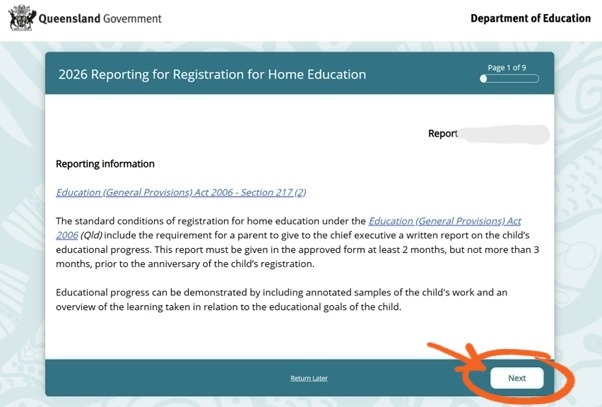
This page contains a general outline of your requirements, which are to provide a written report on the child’s educational progress.
You can also use our Reporting Guide for more help with completing your documentation.
Reference Links:
Reporting form p2 - Privacy Statement
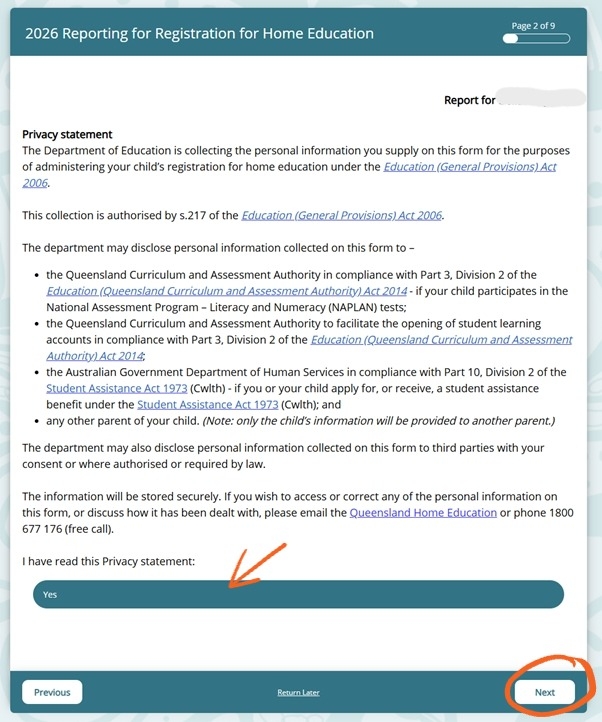
This explains the Privacy statement outlining for what purposes your information will or may be used for.
*Note that this is not the consent for information to be disclosed to third parties, but your awareness of the privacy statement. And any information provided to another requesting parent of the child will not disclose your personal information.
Reference Links:
Reporting form p3 - Instructions
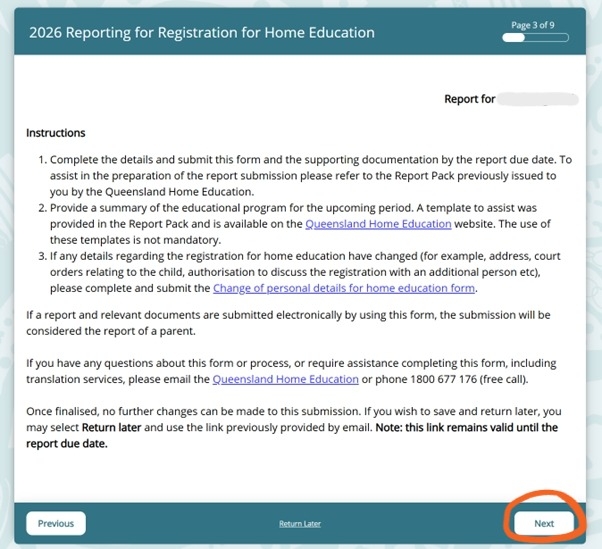
Instructions explaining the reporting process in Queensland. Particular things to note are:
- Complete the form.
- Include your reporting and educational program/plan documents.
- Notify of any changes of details, using THIS form.
- Although no further changes can be made to this submission once completed, if further information is required, QHEU staff will contact you.
Reference links:
Reporting form p4 - Declaration
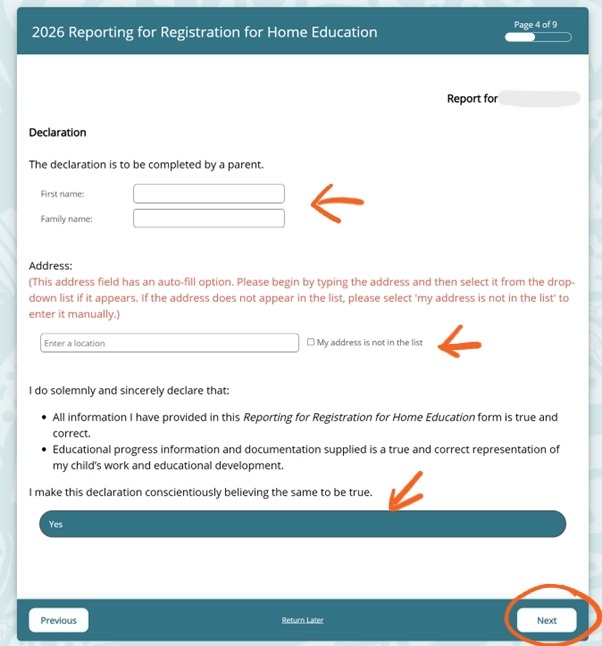
This is the declaration form for the continuation of home education. This is the digital equivalent of the paper version that is also available.
Reporting form p5 - Report files
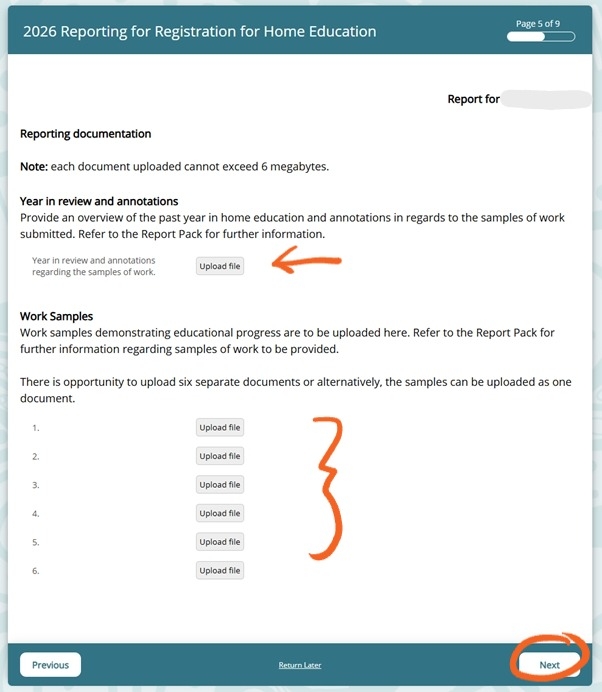
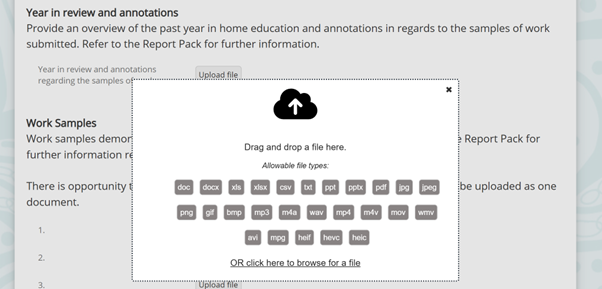
This is where you upload your reporting document.
You can add it all as one file where the arrow shows or attach any secondary files or images in the 6 allocated sections at the bottom.
*Below are a list of the file extensions that are accepted:
- doc
- docx
- xls
- xlsx
- csv
- txt
- ppt
- pptx
- jpg
- jpeg
- png
- gif
- bmp
- mp3
- m4a
- wav
- mp4
- m4v
- mov
- wmv
- avi
- mpg
- heif
- hevc
- heic
Reporting form p6 - Plan files
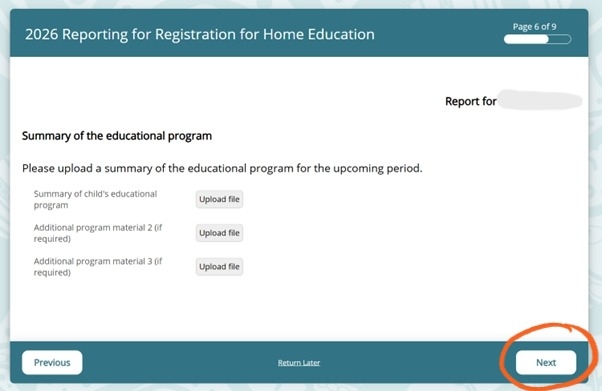
Use this to upload you educational program/plan.
If you have already included all relevant information in the same document as your report uploaded on the previous page, there is no need to use any of these, you can just skip to ‘Next’.
Reporting form p7 - Change of details
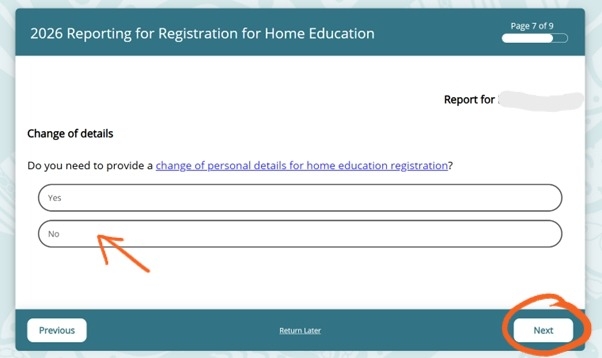
Select ‘No‘ if none of your details have changed since you last notified the QHE Unit.
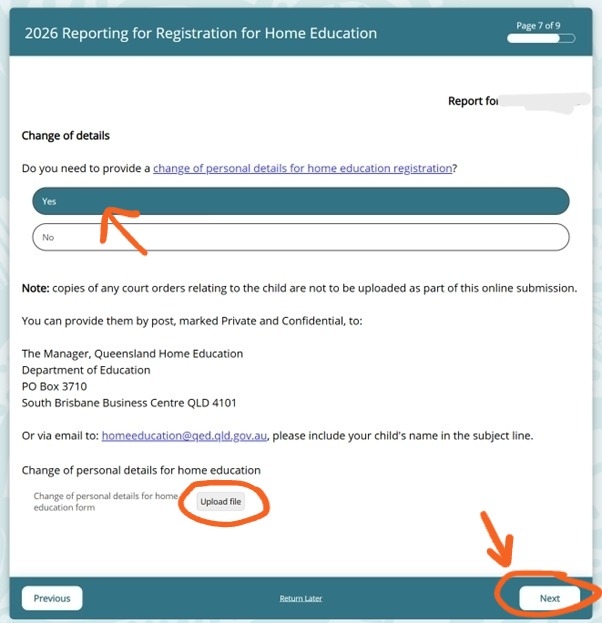
Select ‘Yes‘ if your details have changed since you last notified the QHE Unit and an additional section will open as below…
Reference Links:
Reporting form p8 - Checklist
Checklist to review your uploaded documents.
You are expected to select an option in each row.
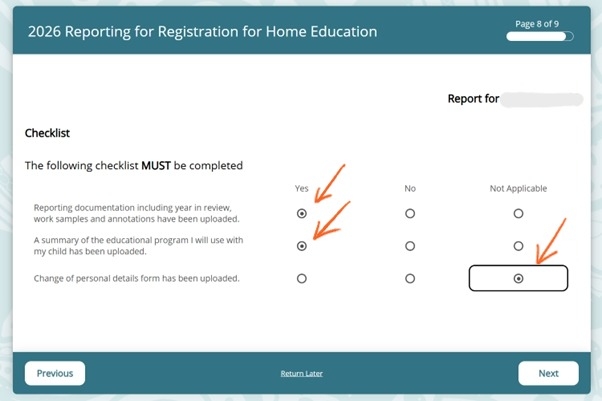
Click ‘Next‘.
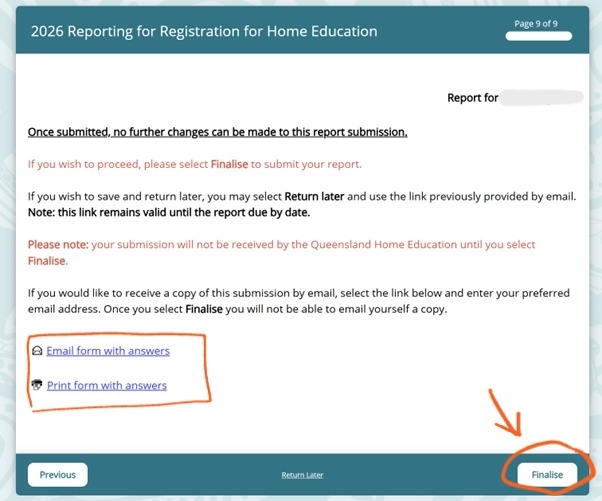
Reporting form p9 - Final steps
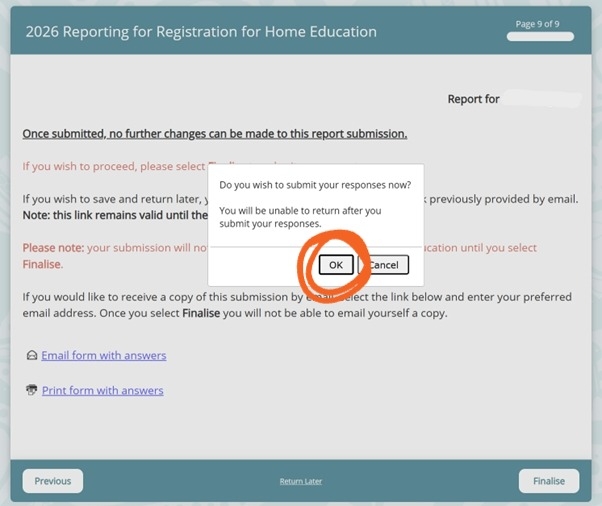
This is your final opportunity to make any changes before clicking ‘Finalise’, which submits your reporting form.
Use the smaller ‘Return Later’ selection in the middle of the bottom bar if you want to return to this later and not submit yet.
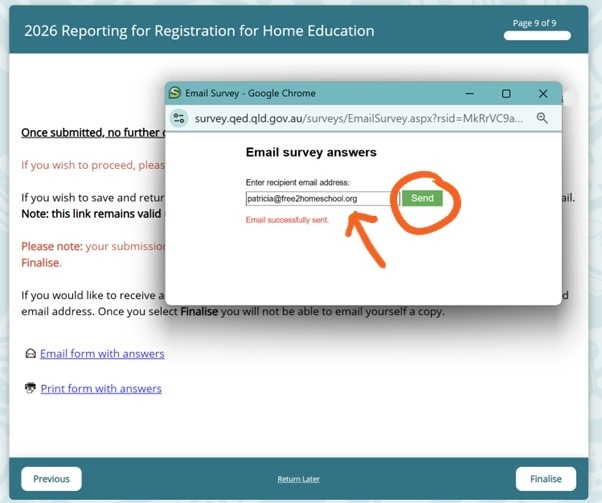
Ensure you also use this opportunity to email or print a copy of this form if you wish.
If you choose to email yourself a copy, you will see this pop up window.
Ensure the ‘Email successfully sent‘ shows before you close this window.
This is the final ‘OK’ button to submit your report form.
Finding Your Community
Connecting with other home educating families
Most home educating families connect via social media, particularly Facebook and Instagram. You can find the Queensland Free2Homeschool community using the icons at the bottom of this page, or join our Facebook group HERE, where you can connect with others with lived experience.
Finding events in the community
Join our Facebook group for events available to the Home Education community across Queensland
I need more personalised support
Email us here at Free2Homeschool or use our contact form to access individual and personalised support specific to your situation, having your questions answered.
I want a plan writing service
Explore additional plan and report services HERE.