How to apply for Home Education in Qld

Getting ready to begin and want help with the process? This is for you.

What do I need to apply for home education?

Under Queensland law, a parent has the right to choose home education for their child by applying to Queensland Home Education (QHE).

Only one parent’s signature is required on the application form to legally register a child.

However, it is important to note:

  • Shared Responsibility: While only one signature is needed for the QHE process, the department assumes that parents are acting in accordance with any existing parenting arrangements.

  • Court Orders: If there are specific Family Court Orders in place stating that educational decisions must be made jointly, or if a court has granted one parent sole responsibility for educational matters, these orders must be respected and disclosed if requested.

  • The “Applicant” Role: The parent who signs the form becomes the primary point of contact for QHE, though a second parent can be listed to ensure they are kept informed of the registration status.

While we often use the term “parent,” the right to register a child for home education extends to anyone who holds legal parental responsibility.

  • Guardians & Carers: You do not necessarily need to be the biological parent of the child to submit an application to Queensland Home Education (QHE).

  • Legal Responsibility: If you are a legal guardian or hold a court order granting you parental responsibility for the child’s education, you are eligible to be the applicant.

  • Documentation: When applying in these circumstances, you simply need to provide the relevant legal documentation (such as a Guardianship Order or Parenting Order) where requested to verify your authority to make educational decisions on their behalf.

Some additional supporting documents that:

  • prove your child is eligible for home education by age (usually a birth certificate)
  • prove you as the child’s parent or legal guardian (usually a birth certificate or other legal document like a Medicare card)
  • summarise your child’s educational plans and goals for the year ahead
  • confirm your child is not enrolled at a school (incl. distance education). (This can be as simple as proof of the date you contacted a school in writing to end an enrolment, such as from your email history)
  • relate to parental responsibility for the child, such as any court orders.
  • You will also need to sign a declaration stating that the information you’re providing is correct. This is available through the application process as well as HERE.

*Sometimes you will also need to provide additional information or documentation to meet the requirements—for example, if your name is different from the name on your child’s birth certificate. If you do not easily recognise what you may need, staff in QHE will make contact with you to discuss and request any additional documentation required. 

Providing evidence of your child’s name and date of birth can be done with one or more of the following:

  • their birth certificate or birth extract
  • their passport
  • citizenship documents
  • Australian visa documents

Compulsory schooling age in Queensland is set out in the Education (General Provisions Act 2006 as 6.5 years to 16 years. During this period children are expected to be participating in a recognised form of education, of which home education is one option. 

However, a child can be registered for home education from the year they are turning 5.5 years, where a child is at least 4 years + 6 months + 1 day on Jan 1 of that year, up until the end of the year the child turns 18 years. This extends beyond the compulsory schooling age at both the younger and older ages where a child can be registered by choice. 

The Department of Education’s Queensland Home Education (QHE) unit (formerly HEU) is the regulatory authority in Queensland. They can be shortened to QHE or QHEU. 

To apply online or by email/post, complete the application options in STEP 1 on the Queensland Home Education website HERE.

You can also follow our easy step by step guide in the next section below to assist you with the online application process. 

~~~~~~~~~~

The applicant is the child’s parent or guardian, not the child. You can include the details of a second applicant parent on the application form. Queensland Home Education will discuss the application only with the parents who are named on the form.

You must have a Queensland home address and provide home education principally at the child’s usual place of residence.

Make sure the name on the document showing you have parental responsibility matches the name you write in your application. If you have changed your name, you will need to provide extra documentation like a marriage certificate or a change-of-name certificate to show the connection.

If your family has any court orders in place that relate to parental responsibility for the child, you must provide a copy of these with your application.

You must complete all sections of the form. You’ll need to fill out a separate application form for each child you are wishing to register for home education.

Parents must submit annual reports to the QHE demonstrating their child’s educational progress. Reports are due in the 10th month of the child’s registration. This is expected to include some samples in English, Math, and one other area.

Completing the QHE application

The following is a step by step of the application process to help you plan and complete the application form online at QHE.

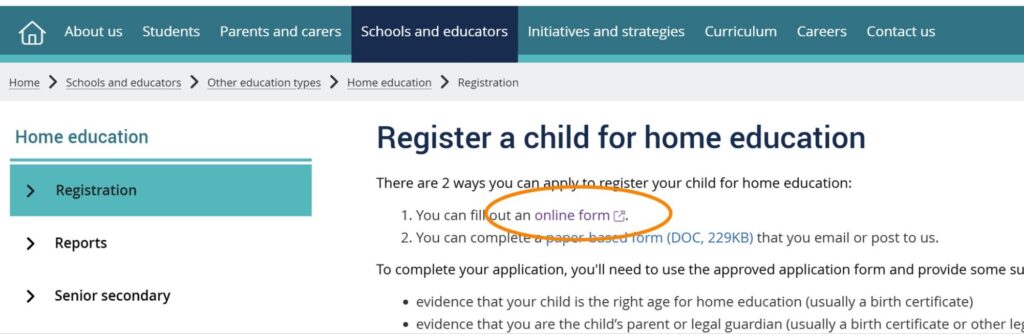
To open the online application, head to the QHEU website and click the online form option in option 1. 

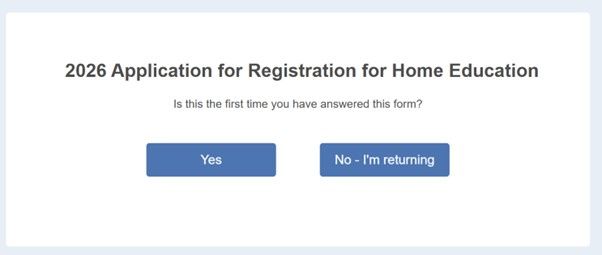
Select your appropriate button here. Choose ‘Yes‘ if you are just beginning your application from the start, and ‘No – I’m returning‘ if you have an existing code from a previous session and it has been less than 30 days.

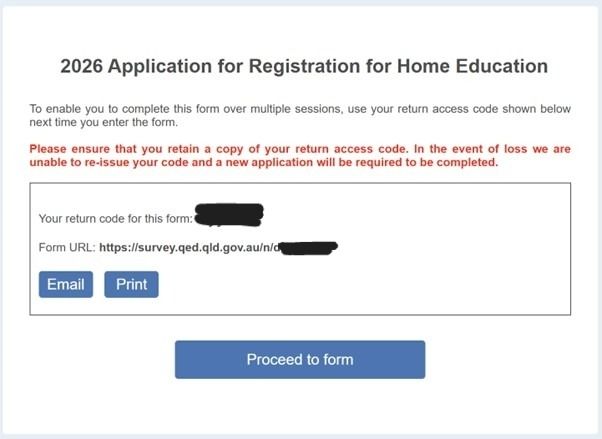
If you have just begun your application today, this code and link can be saved if you are unable to complete the application in full in this one session. 

*Note: your provisional registration will only commence once you complete this entire form and submit at the end. If you need registration today, you can do this without attaching the documents you do not yet have available to still begin your provisional registration.

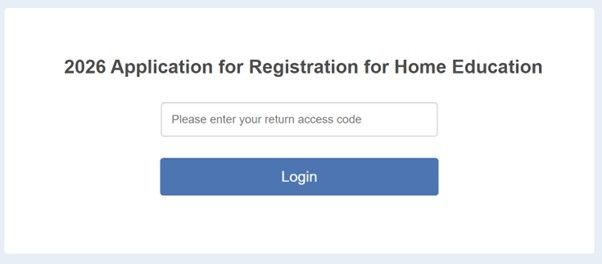
If you are returning from a previous session, this is where you can use your code that you saved from last session.

*Remember this is only valid for 30 days, then it expires and you will need to begin again.

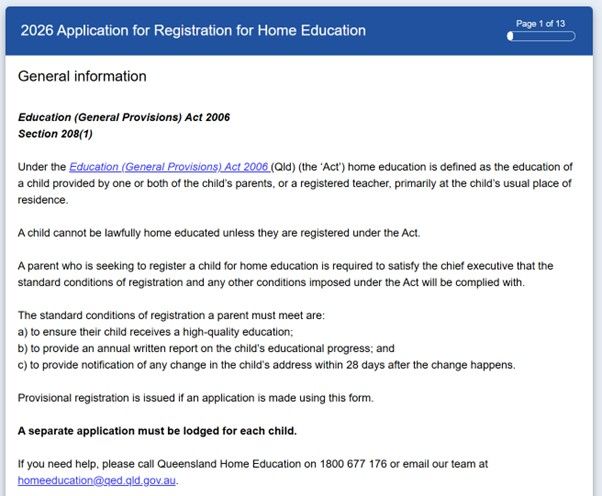
Below is some general information explaining home education registration in Queensland. Particular things to note are:

  1. Home education needs to be provided by one or both parents, a registered teacher, or legal guardian of the child, and take place from the home as the base location.
  2. The requirements of home education are to (a) ensure the child receives a high quality education, (b) provide an annual report on educational progress of the child, and (c) notify QHE of any changes to the home address within 28 days of the change.
  3. One application form can ONLY be valid for ONE CHILD. If you have more than one child, you will need to complete an application for each one. 

This is page 1 of the form. 

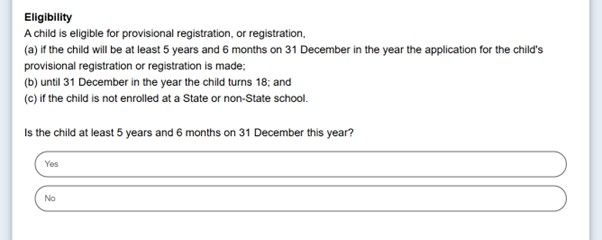
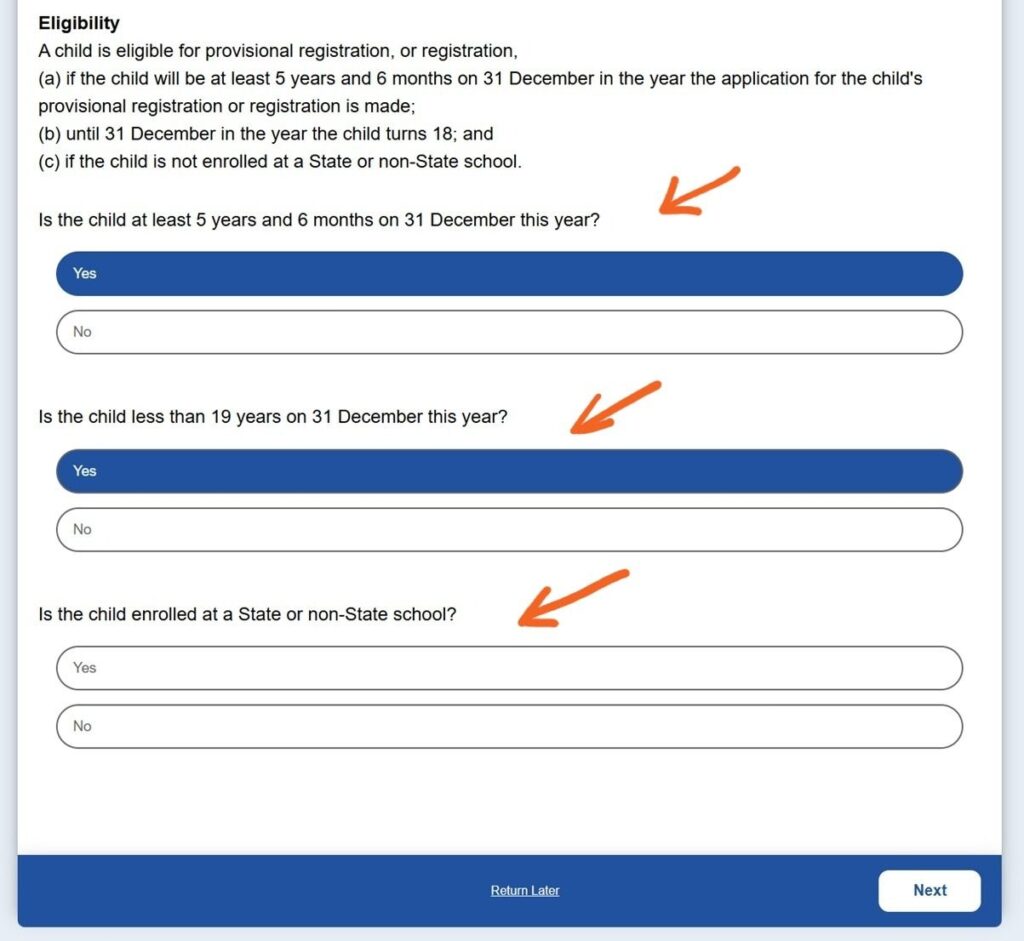
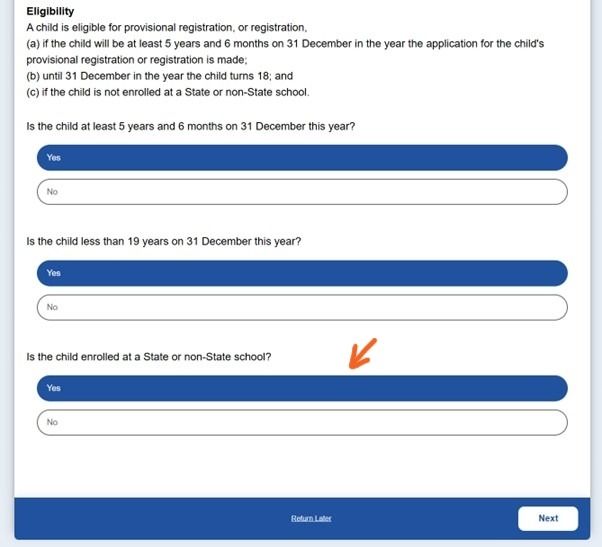
This is where you also check your child’s eligibility below. 

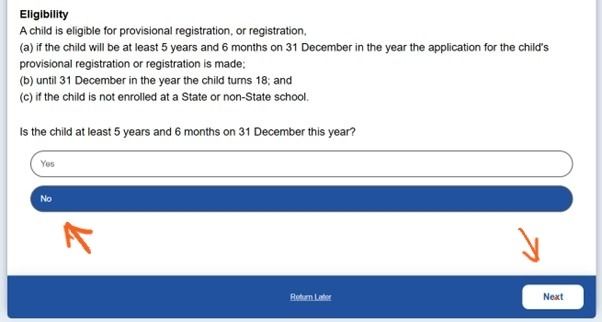
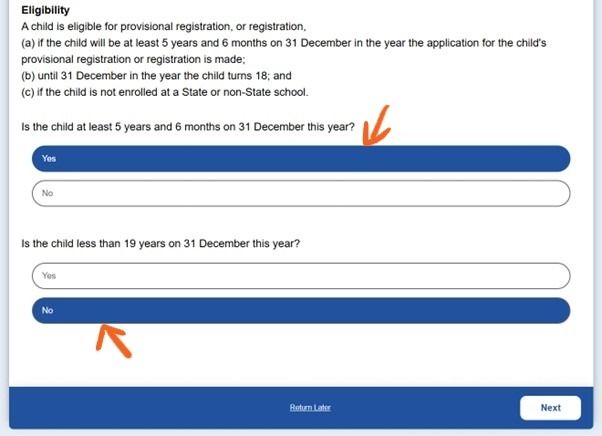
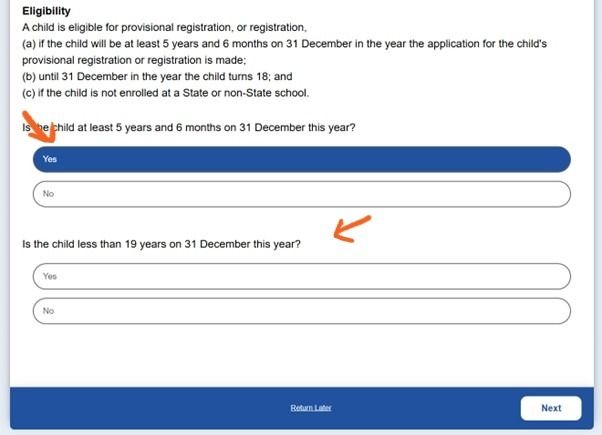
Choose the appropriate answer indicating your child’s age. Will your child be 5.5 years or older by December 31 this year?

If your child has their 5th birthday any day before June 30 this year, please skip to the next section.

If your child will still be 4 years old by June 30th, select ‘No‘ and then click next. 

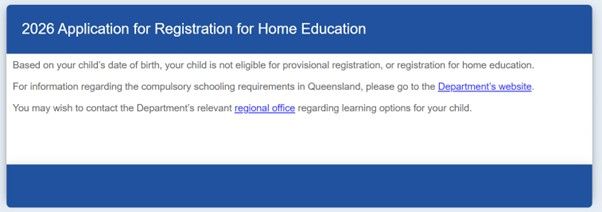
You will see the following notification that your child is not yet eligible for home education. This means that if they were to attend a mainstream school, they are not yet the eligible age for prep in Queensland. 

You will not be able to register this year if this is the case. 

If your child is less than 19 years old during all of this year, please skip to the next section.

If your child will have their 19th birthday any time this year, select ‘No‘ and then click next. 

You will see the following notification that your child is no longer eligible for home education.  

You will not be able to register this child any longer if this is the case. 

If your child has their 5th birthday any day before June 30 this year, AND does not turn 19 years this year, then you select ‘Yes‘ to both the age questions.

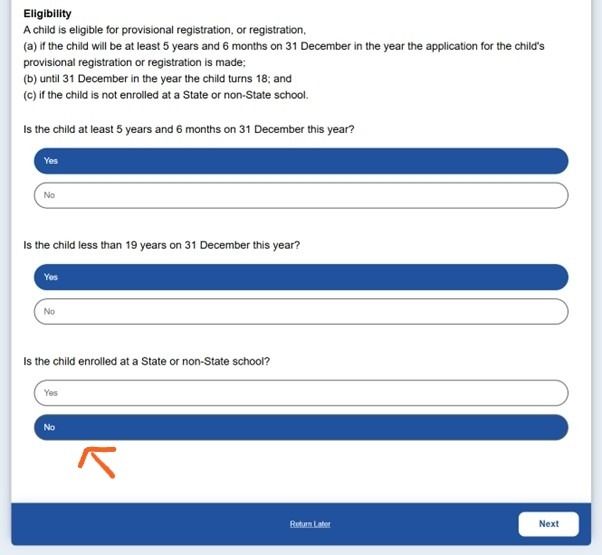
Next you need to indicate if your child is currently enrolled in a school or not.

*This will NOT prevent you from being able to register if you have notified the school of your intention.

Select ‘No‘ if your child is no longer enrolled in a school or was never enrolled in a school.

However, if your child is still enrolled in a school, please skip to the next section.

From here, click ‘Next‘ and head straight to the ‘Form page 2’ help tab below. 

Select ‘Yes‘ if your child is still enrolled in a school. (A school includes distance education schools).

Then click ‘Next

*This will NOT prevent you from being able to register if you have notified the school of your intention.

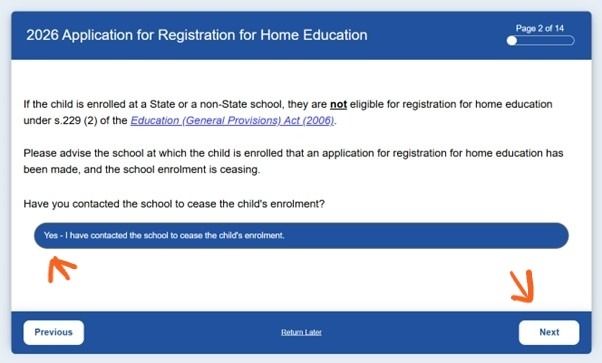
You are required to cancel your school enrolment to be eligible for home education registration. As the educational environment a child learns in is the responsibility of the parent, if you have informed the school of your intention to home educate AND notified the school of an end date of the child’s enrolment AND that date has arrived or passed, you have satisfied the requirements under the law. And you can select ‘Yes‘ here and continue to ‘Next‘. 

If you are yet to inform the school of your intentions to home educate, you will need to do that first to meet this requirement and be able to select ‘Yes‘. If you need help with an email template, we have that help HERE. 

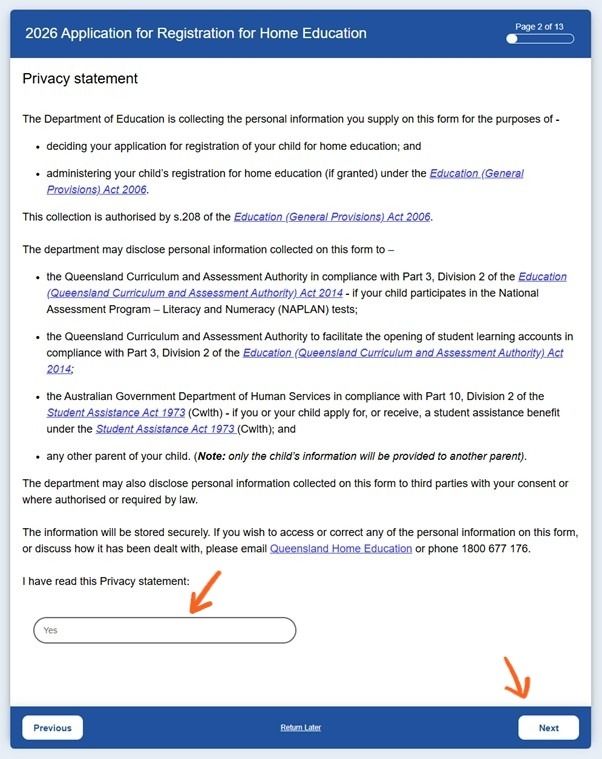
Click ‘Next‘ and continue to ‘Form page 2’ to read the privacy statement.

This explains the Privacy statement outlining for what purposes your information will or may be used for. 

*Note that there is still disclosure to seek your consent where any information is to be disclosed to third parties, and this selection does not approve such. And any information provided to another requesting parent of the child will not disclose your personal information.

Click ‘Next‘ and continue to ‘Form page 3’ to begin the application details.

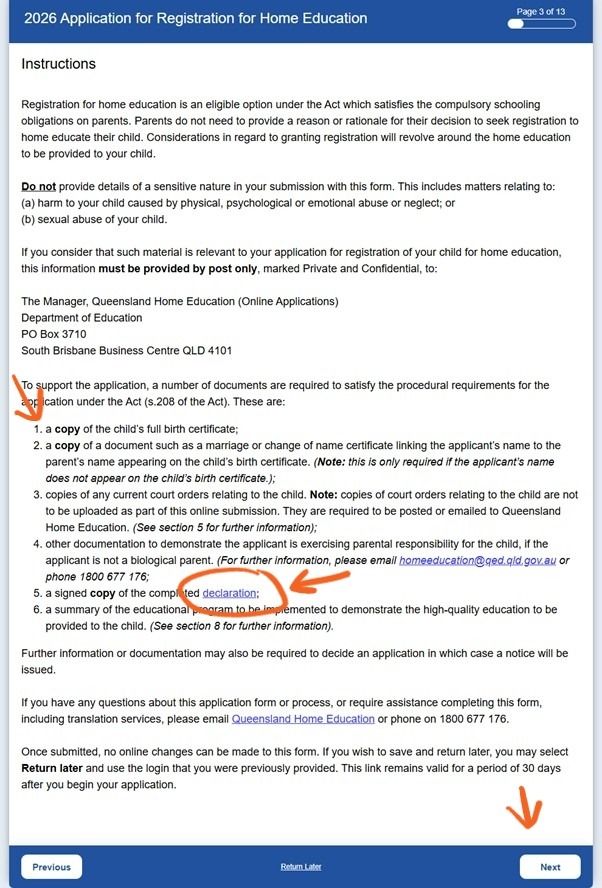
This explains how this application form works. 

I promise this is the last big chunk of reading!

If you want a summary, here it is:

  • home education is a legal and valid option for any child you are responsible for
  • this form, or the documents you upload, are not the space to share information about harm or abuse of your child – this can only be posted by snail mail IF it is relevant to your application
  • you will need some documents attached now or emailed later to support your application, please see the list #1-6, and particularly note the circled declaration is a link to download that document to upload later in the form
  • once you click submit at the end, no further changes can be made to this information, but you can email the listed documents at a later date to the QHE email: homeeducation@qed.qld.gov.au 

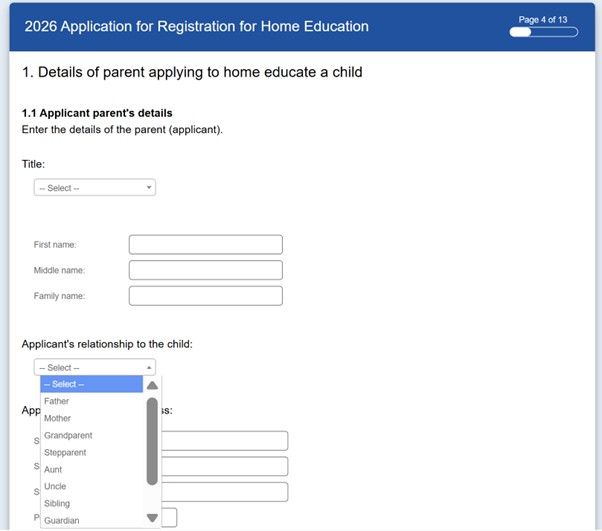
Click ‘Next‘ and continue to ‘Form page 4’ to complete your details.

*If you were unable to download the Declaration file linked in the application, we have it attached HERE in word format or HERE as a PDF.

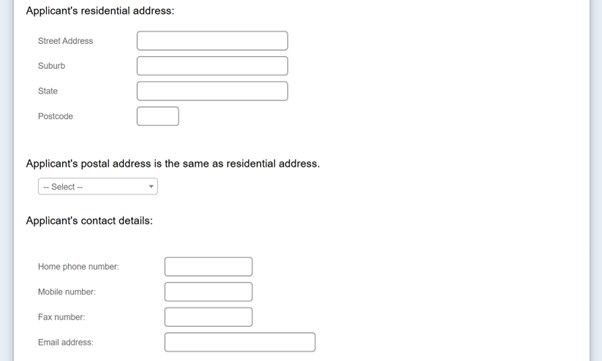
This is where you complete your personal details. 

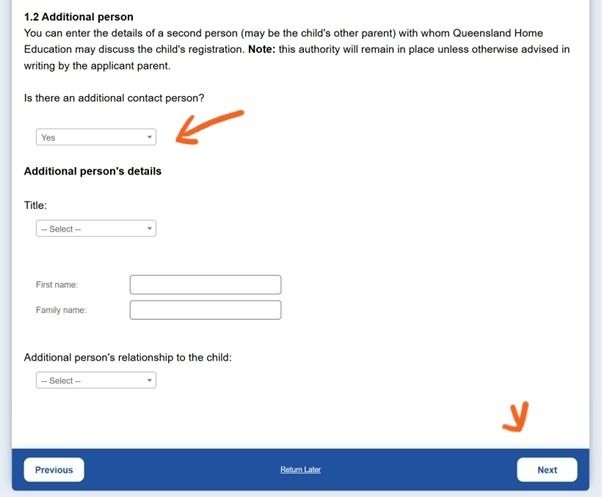
If you have a second parent to add, you can choose that by selecting ‘Yes‘ shown by the arrow. This is optional and only needs one parent on the registration in Queensland.

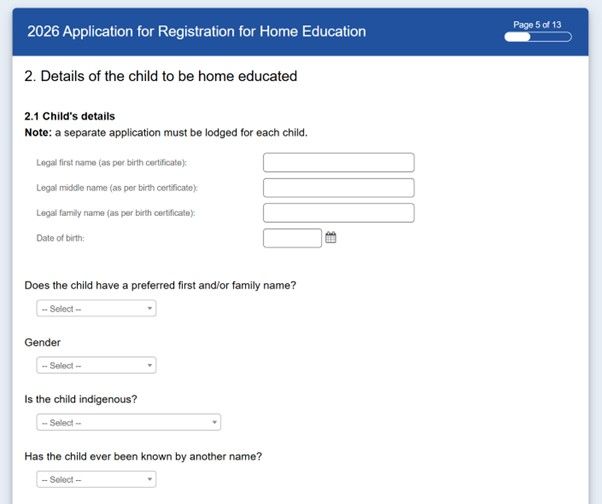
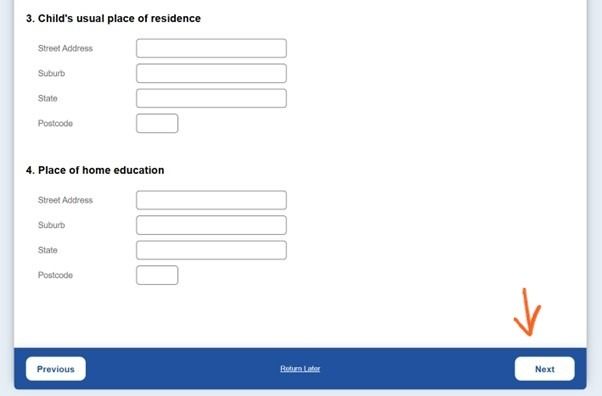
Click ‘Next‘ and continue to ‘Form page 5’ for the child’s details. 

This is where you complete your child’s details. 

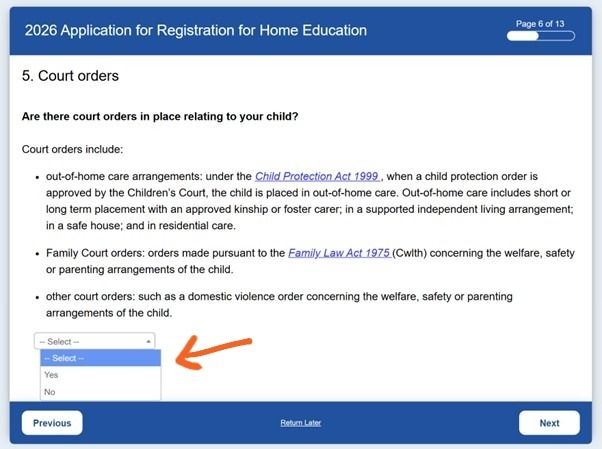
Click ‘Next‘ and continue to ‘Form page 6’ where you can indicate any court orders in place. 

If you have no court orders pertaining to your child, select ‘N0‘ here, then click ‘Next‘ and continue to ‘Form page 7’ about past education. 

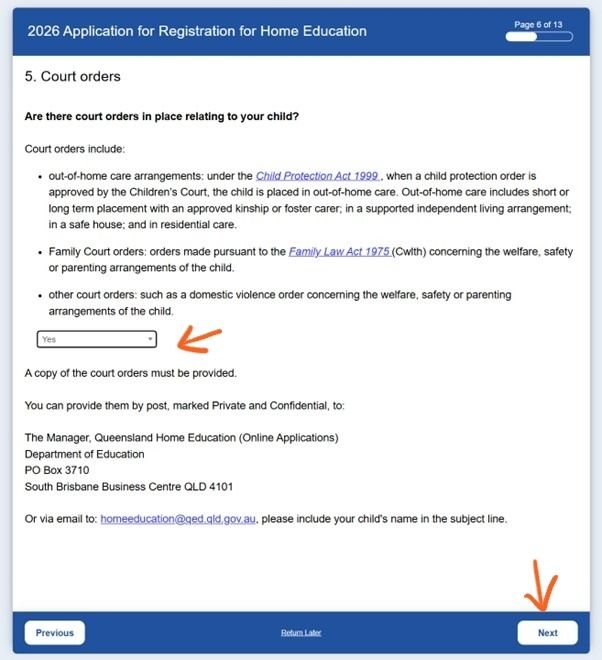
If you have court orders, select ‘Yes‘ and further information will appear that explains how to notify the QHEU of these.

Never upload your court orders in this form, in any section!

This includes any orders regarding the child’s welfare or safety or parenting arrangements of the child, such as:

  • out of home care arrangements with a child protection order, whether short or long term placements
  • family court orders
  • any other court orders such as DVO 

.

Instead, you can either post them with a clear label of Private and confidential to:

  • The Manager, Queensland Home Education (Online Applications
    Department of Education
    PO Box 3710
    South Brisbane Business Centre Qld 4101

.

or email them with your child’s name in the subject line to the QHE email:

  • homeeducation@qed.qld.gov.au

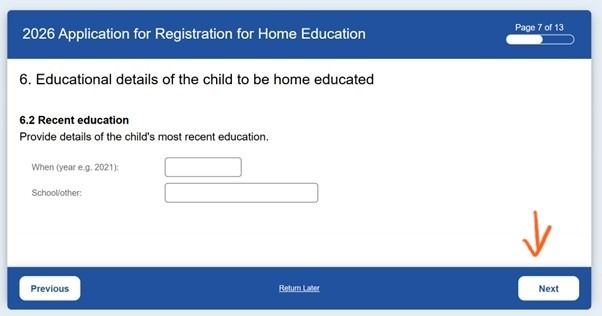
Click ‘Next‘ and continue to ‘Form page 7’ about past education. 

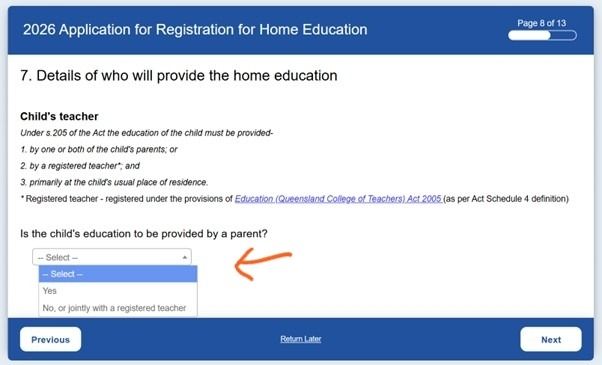
This information is completely optional. You can choose to complete it, or simply click ‘Next‘ and continue to ‘Form page 8’ about who will be your child’s educator. 

This is indicating if your child’s education will be provided by a parent, or if you will be utilising the services of a registered teacher.

To indicate a parent, select ‘Yes‘ here. 

*Selecting ‘Yes‘ here does not restrict you from accessing classes and activities within the community.

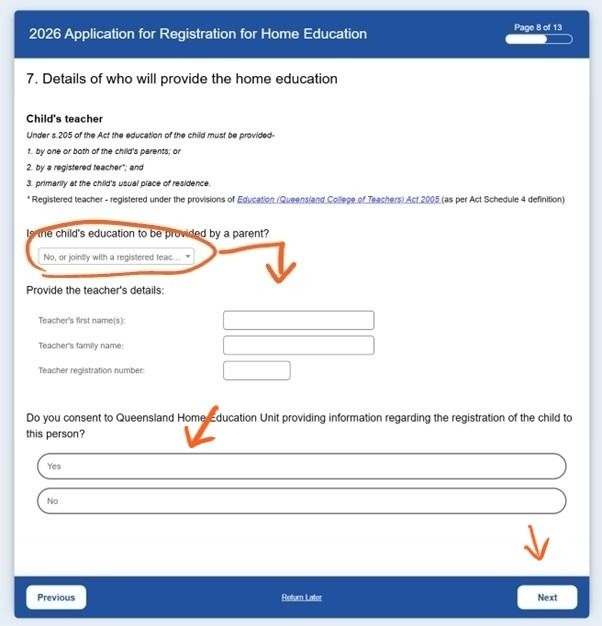
If you will be using a registered teacher to provide your child’s education, please indicate with ‘No‘ and follow the additional information in the next section below.

If you selected ‘Yes‘, skip click ‘Next‘ and continue to ‘Form page 9’ about the educational program.

If you selected ‘No‘ see the further information in the next step for ‘Form page 8’. 

If you selected ‘No‘ to a parent will not be providing the education to the child, then you will need to fill in additional information about the chosen teacher’s information and registration number. 

You also need to indicate whether you consent to the QHEU providing information to this teacher.

Click ‘Next‘ and continue to ‘Form page 9’ about the educational program. 

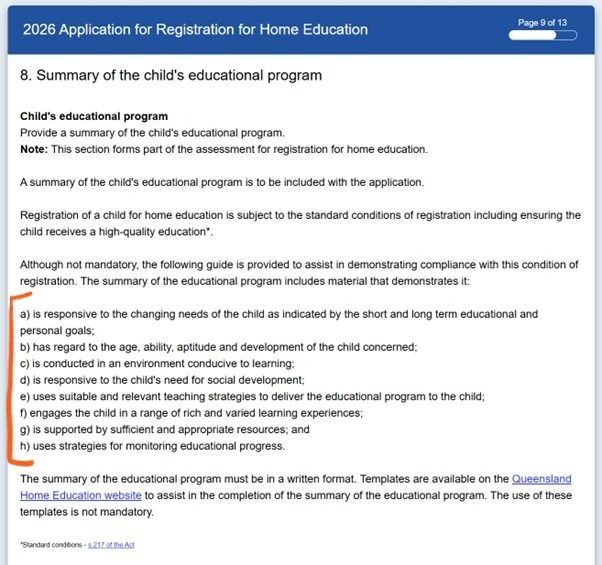
This is a summary of what you need to include in a child’s educational program, or educational plan. 

Although you are required to include an educational program with the application, it does not need to be uploaded now, or to submit this form, if you are still working on it or seeking guidance on creating one. 

This page explains the 8 requirements of a plan/program, listed as (a) – (h) and marked in orange here.

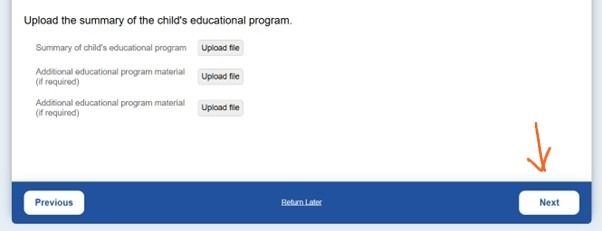
On this page you can either:

  • upload the educational program in the upload section here if you have it ready
  • continue working on it, saving your code from the beginning of this form to return to here later, and upload it when you have it ready
  • not upload it at this time, and continue completing this form. Instead emailing it to homeeducation@qed.qld.gov.au at a later date with your child’s name in the subject line.

Click ‘Next‘ and continue to ‘Form page 10’ to upload any other required documents. 

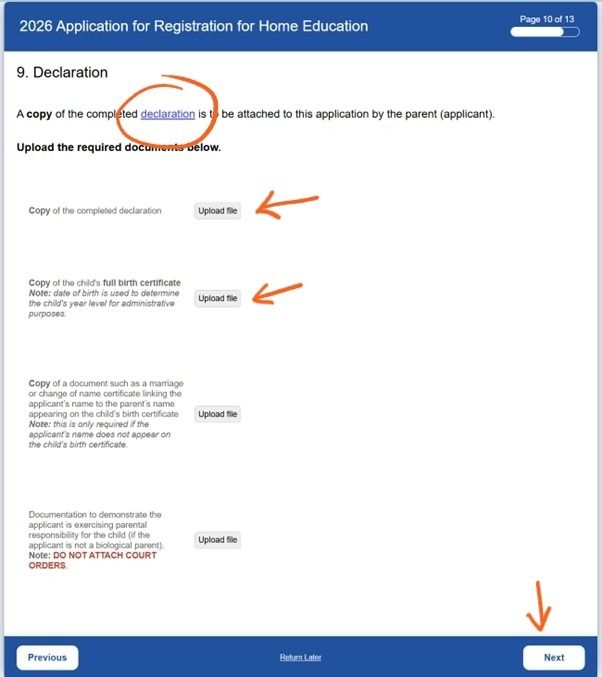
This is where you upload any other documents (but not court orders) that support your application.

There is also another link to the declaration required if you did not save it earlier.

As with the educational program, in this page you can either:

  • upload the documents in the upload sections here if you have them ready
  • continue working on them or gathering them, saving your code from the beginning of this form to return to here later, and upload them when you have them ready
  • not upload them at this time, and continue completing this form. Instead emailing them to homeeducation@qed.qld.gov.au at a later date with your child’s name in the subject line.

Click ‘Next‘ and continue to ‘Form page 11’ review the uploaded documents. 

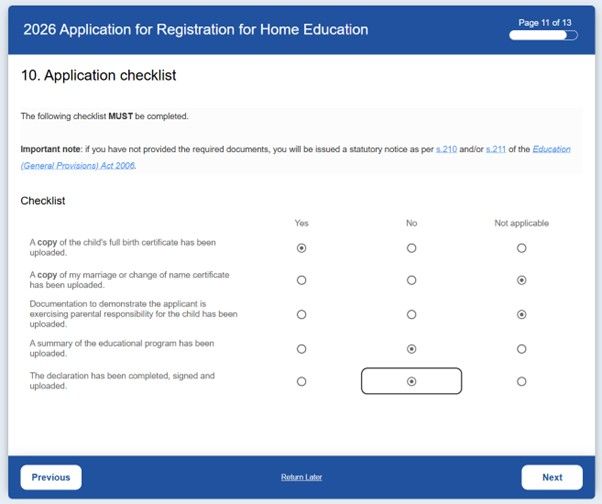
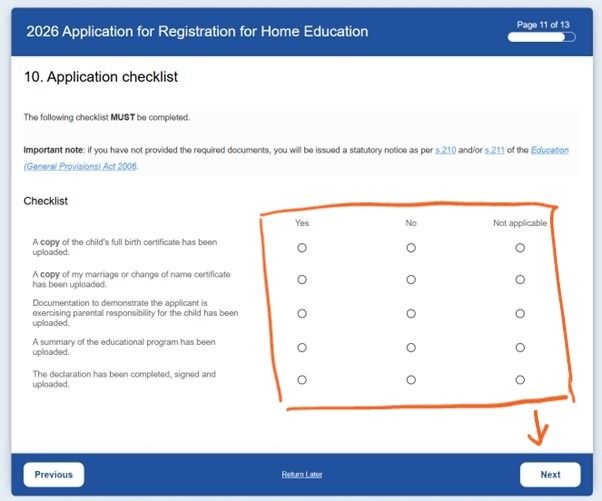
This section needs to be completed, here is an example of how that could look. 

*Note: it is ok if some things have ‘No’ selected on this page. This does not prevent your application from submitting. 

Ensure all of these rows have at least one selection chosen. 

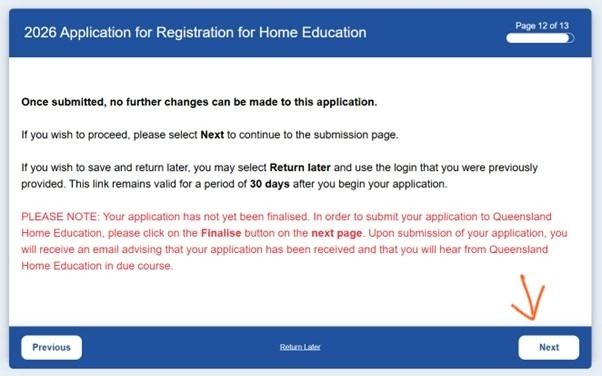
Click ‘Next‘ and continue to ‘Form page 12’ prepare to submit your form. 

This is your final warning to make any changes before continuing to the next page, which submits your application.

If you are happy that the information you provided to this point is correct, click ‘Next‘ and continue to ‘Form page 13’ to submit your application. 

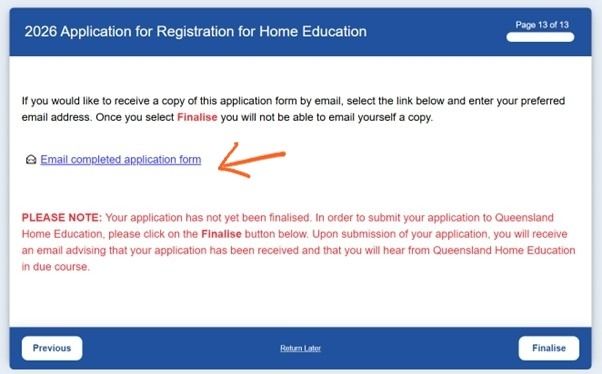
This is your application submission page.

Here you can choose to have a copy of your application form sent to your email for your records. 

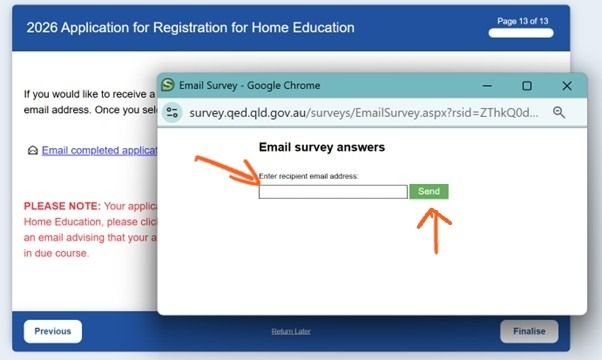
Click on the highlighted blue underlined text and insert your email address into the pop up window/tab shown. 

*Note: this is optional.

Click ‘Send‘ and WAIT until the window processes that request and takes you back to the previous view before clicking away.

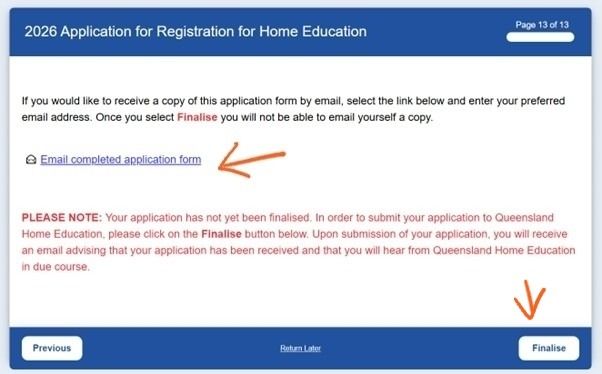
Once you are satisfied with your application form, have sent yourself a copy if you wish, then you can click ‘Finalise‘ to submit your application. 

Once you click ‘Finalise‘ … CONGRATULATIONS! You are now officially registered for home education. 

Finding Your Community

Most home educating families connect via social media, particularly Facebook and Instagram. You can find the Queensland Free2Homeschool community using the icons at the bottom of this page, or join our Facebook group HERE, where you can connect with others with lived experience.

Join our Facebook group for events available to the Home Education community across Queensland

Email us here at Free2Homeschool or use our contact form to access individual and personalised support specific to your situation, having your questions answered.

Explore additional plan and report services HERE.  

**The information on this page is for educational purposes to be used as a guide only. It is your responsibility to ensure the information you use is appropriate to your personal circumstances before proceeding. We take no responsibility for misleading or false information you provide in your communications based on the loose guide we have offered on this page.